Thursday, 5 May 2022

Angular Login with Session Authentication - iFour Technolab


Angular Login with Session Authentication

Introduction

In this article, we'll look at how to handle the login process with Session Authentication. We'll verify if the user is logged in or not, and if he is not, then the route will simply be blocked.

Let’s go through the following Angular principles for better understanding.s


Angular Routing module

Manage the user authentication permission for the Angular path.


Angular Auth Guard

This Angular function helps a lot when it comes to handling authentication. This is an interface that instructs the router whether or not to enable navigation to a specific route. We're using the 'canActivate' guard form in this case.


Angular localStorage

In an Angular program, there are three ways to store data on the client-side.

  1. Memory
  2. Session storage
  3. Local Storage.

We're using localStorage in this case, which saves data in the client browser. It can only be used in a modern browser. When the window is closed or reopened while in session storage, the data is retained; however, when the tab is closed, the data will be lost. It's easy to create a new Angular project using a command. Given is the localStorage syntax which simply helps you to save up to 10MB of data in the browser.

Using the below command, create a new Angular project.

npm install bootstrap

Add the following line to the src/styles.css file after installation:

@import '~bootstrap/dist/css/bootstrap.min.css';

Build two components, one for login and one for the dashboard. 

@import '~bootstrap/dist/css/bootstrap.min.css';

Create a service called auth.

Make a new user interface for logging in.

Using the command lines below, create a new guard called auth.

The Angular route guard, which can tell the router whether or not to enable navigation to a requested route, is referred to as Angular guard.

ng g component login

ng g component dashboard

ng g service services/auth //Build a service in the Services folder.

ng g interface interfaces/login //In the interfaces folder, build a new interface.

ng g guard guards/auth //Build a new guard in the Guards folder.

In the Login interfaces, add two properties.

Login.ts


export class ILogin {
userid: string;
password: string;

}

Now navigate to guards/Auth.guard.ts. Import the @angular/router package's 'canActivate' interface.

Auth.guard.ts


import { Injectable } from '@angular/core';
import { ActivatedRouteSnapshot, RouterStateSnapshot, CanActivate, Router } from '@angular/router';
import { Observable } from 'rxjs';
@Injectable({
providedIn: 'root'
})
export class AuthGuard implements CanActivate {
constructor(private router: Router) { }
canActivate(route: ActivatedRouteSnapshot, state: RouterStateSnapshot): boolean {
if (this.isLoggedIn()) {
return true;
}
// navigate to login page as user is not authenticated
this.router.navigate(['/login']);
return false;
}
public isLoggedIn(): boolean {
let status = false;
if (localStorage.getItem('isLoggedIn') == "true") {
status = true;
}
else {
status = false;
}
return status;
}
}

Import the AuthGuard module into the app.module.ts format.

import { AuthGuard } from './guards/auth.guard';

Then, from the @angular/forms package, import ReactiveFormsModule and FormsModule into this file.

Our app.module.ts file should now look like this.

import { BrowserModule } from '@angular/platform-browser';
import { NgModule } from '@angular/core';
import { AppRoutingModule } from './app-routing.module';
import { AppComponent } from './app.component';
import { LoginComponent } from './login/login.component';
import { DashboardComponent } from './dashboard/dashboard.component';
import { AuthGuard } from './guards/auth.guard';
import { FormsModule, ReactiveFormsModule } from '@angular/forms';
@NgModule({
declarations: [
AppComponent,
LoginComponent,
DashboardComponent
],
imports: [
BrowserModule,
AppRoutingModule,
FormsModule,
ReactiveFormsModule
],
providers: [AuthGuard],
bootstrap: [AppComponent]
})
export class AppModule { }
 

Now edit the app-routing.modue.ts file to include login and dashboard routes. To verify user authentication, add the ‘canActivate' attribute here. It will redirect to the login page if the user is not allowed.

import { NgModule } from '@angular/core';
import { Routes, RouterModule } from '@angular/router';
import { LoginComponent } from './login/login.component';
import { DashboardComponent } from './dashboard/dashboard.component';
import { AuthGuard } from './guards/auth.guard';
const routes: Routes = [
{ path: 'login', component: LoginComponent },
{ path: 'dashboard', component: DashboardComponent, canActivate : [AuthGuard] }];
@NgModule({
imports: [RouterModule.forRoot(routes)],
exports: [RouterModule]
})
export class AppRoutingModule { }

In the app.component.html file, add the HTML code below.

<xmp><div class="container">
<!-- Static navbar --><nav class="navbar navbar-inverse"><div class="container-fluid"><div class="navbar-header"><button aria-controls="navbar" aria-expanded="false" class="navbar-toggle collapsed" data-target="#navbar" data-toggle="collapse" type="button">
<span class="sr-only">Toggle navigation</span></button>
<a class="navbar-brand" href="#">Angular Registration</a></div>
<div class="navbar-collapse collapse" id="navbar"><ul class="nav navbar-nav"><li> </li><li routerlinkactive="active">
<a routerlink="/login">Login</a></li><li> </li><li routerlinkactive="active">
<a routerlink="/dashboard">Dashboard</a></li><li> </li></ul></div>
<!--/.nav-collapse --></div>
<!--/.container-fluid --></nav>
<router-outlet></router-outlet></div>
</xmp>

The path of the URL is stored in routerLink, and routeLinkActive adds the class active to the selected menu. According to the route URL, will determine which View to show.

Import the ILogin interface into the auth.service.ts file.

import { ILogin } from 'src/app/interfaces/login';

Within this service class, add a Logout() method.

import { Injectable } from '@angular/core';
import { ILogin } from '../interfaces/login';
@Injectable({
providedIn: 'root'
})
export class AuthService {
constructor() { }
logout() :void {
localStorage.setItem('isLoggedIn','false');
localStorage.removeItem('token');
}
}

Now import Router from the @angular/router package into the login.component.ts module. Within this file, import the login interface and the AuthService.

import { Router } from '@angular/router';
import { ILogin } from 'src/app/interfaces/login';
import { AuthService } from '../services/auth.service'

Also, import the @angular/forms package's FormBuilder, FormGroup, Validators.

import { FormBuilder, FormGroup, Validators } from '@angular/forms';

Inside the function Object() { [native code] }, create three instances: router, service, and formBuilder.

constructor(
private formBuilder : FormBuilder,
private router : Router,
private authService : AuthService
) { }

Set default parameters for a new variable modal as the ILogin interface.

model: ILogin = { userid: "admnin", password: "admin@123" }

Make a loginForm variable with the FormGroup sort. The message is a string, and the returnURL is also a string.

loginForm: FormGroup;
message: string;
returnUrl: string;

Build a new formGroup within the ngOnInit() method and apply the necessary validation to both properties.


Looking for Trusted AngularJS Development Company ? Your Search ends here.

 
ngOnInit() {
this.loginForm = this.formBuilder.group({
userid: ['', Validators.required],
password: ['', Validators.required]
});
this.returnUrl = '/dashboard';
this.authService.logout();
}

Add a get method to make it easier to access the form.

get f() { return this.loginForm.controls; }

Inside this class, add the Login() method.

login() {
if (this.loginForm.invalid) {
return;
}
else {
if (this.f.userid.value == this.model.userid && this.f.password.value == this.model.password) {
console.log("Login successful");
//this.authService.authLogin(this.model);
localStorage.setItem('isLoggedIn', "true");
localStorage.setItem('token', this.f.userid.value);
this.router.navigate([this.returnUrl]);
}
else {
this.message = "Please check your userid and password";
}
}
}

As a result, login.component.ts would look something like this:

import { Component, OnInit } from '@angular/core';
import { Router } from '@angular/router';
import { ILogin } from 'src/app/interfaces/login';
import { AuthService } from '../services/auth.service'
import { FormBuilder, FormGroup, Validators } from '@angular/forms';
@Component({
selector: 'app-login',
templateUrl: './login.component.html',
styleUrls: ['./login.component.css']
})
export class LoginComponent implements OnInit {
model: ILogin = { userid: "admnin", password: "admin@123" } 6
loginForm: FormGroup;
message: string;
returnUrl: string;
constructor(
private formBuilder: FormBuilder,
private router: Router,
private authService: AuthService
) { }
ngOnInit() {
this.loginForm = this.formBuilder.group({
userid: ['', Validators.required],
password: ['', Validators.required]
});
this.returnUrl = '/dashboard';
this.authService.logout();
}
// convenience getter for easy access to form fields
get f() { return this.loginForm.controls; }
login() {
// stop here if form is invalid
if (this.loginForm.invalid) {
return;
}
else {
if (this.f.userid.value == this.model.userid && this.f.password.value == this.model.password) {
console.log("Login successful");
//this.authService.authLogin(this.model);
localStorage.setItem('isLoggedIn', "true");
localStorage.setItem('token', this.f.userid.value);
this.router.navigate([this.returnUrl]);
}
else {
this.message = "Please check your userid and password";
}
}
}
}

Login.component.html

<xmp><div class="container"><div class="col-md-6 col-md-offset-3 loginBox"><h3>Log In</h3>
<p>{{message}}</p>
<form><div class="form-group clearfix">
<label class="col-md-3 col-sm-5 col-xs-12" for="userid">Userid</label>
<div class="col-md-9 col-sm-7 col-xs-12">
<input class="form-control" formcontrolname="userid" type="text" /><div><div>Userid is required</div></div></div></div>
<div class="form-group clearfix">
<label class="col-md-3 col-sm-5 col-xs-12" for="password">Password</label>
<div class="col-md-9 col-sm-7 col-xs-12">
<input class="form-control" formcontrolname="password" type="password" /><div><div>Password is required</div></div></div></div>
<div class="col-xs-12 form-group text-right"><button class="btn btn-success" type="submit">Login</button></div></form></div></div>
</xmp>

Dashboard.component.ts

Implement the logout() method inside this.ts format. This page will be inaccessible if the user is not authenticated, and the user will be directed to the login page.

import { Component, OnInit } from '@angular/core';
import { Router } from '@angular/router';
import { AuthService } from '../services/auth.service';
@Component({
selector: 'app-dashboard',
templateUrl: './dashboard.component.html',
styleUrls: ['./dashboard.component.css']
})
export class DashboardComponent implements OnInit {
id: string;
constructor(private router: Router, private authService: AuthService) { }
ngOnInit() {
this.id = localStorage.getItem('token');
//console.log(this.id);
}
logout() {
console.log('logout');
this.authService.logout();
this.router.navigate(['/login']);
}
}

Dashboard.component.html

The logged user's id will be shown within id if the user is registered.

<xmp><div class="container"><div class="col-md-6 col-md-offset-3 loginBox">
Welcome, {{id}}
<a href="javascript:void(0);">Logout</a></div></div>
</xmp>

Conclusion

In this blog, we have learned Angular Login with Session Authentication. We can manage user authentication, route access, and the session variable using this method. If the user is not authenticated, we may use this Angular Guard method to prevent requested navigation.


Wednesday, 4 May 2022

Differences Between ASP.NET and ASP.NET Core - ASP.NET vs ASP.NET Core - iFour Technolab

Differences Between ASP.Net and ASP.Net Core - ASP.Net vs ASP.Net Core

What is Asp.NET?

ASP.NET a fundamental web development platform used to create websites, applications and web services. It is the integration of HTML, CSS and JavaScript. Originally ASP.net was released in 2002. The first version of Asp.Net deployed was 1.0. The Recent Version of Asp.Net is 4.6.

Asp.Net works on HTTP (Hypertext Transfer Protocol) and uses the HTTP commands and policies to set a browser to server bilateral communication.

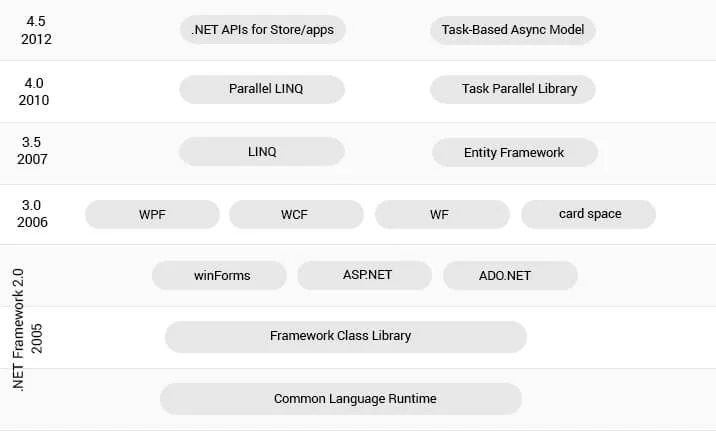
ASP.NET is a part of the Microsoft .NET Framework. The following image shows the component stack.


Asp.Net Introduction

ASP.NET provides three development styles for creating web applications:

  • Web Forms
  • ASP.NET MVC
  • ASP.NET Web Pages

1. Web Forms: ASP.NET web forms extend the event-driven model of interaction to web applications. It is used to develop an application with data access and also provide server-side and event to create an application.

2. Asp.Net MVC: ASP.NET web forms extend the event-driven model of interaction to web applications. It is used to develop an application with data access and also provide server-side and event to create an application.

3. Asp.Net Web Pages: It is used to create dynamic web pages. It combines a server code with HTML in a fast way.

The following table illustrates each development model.

ModelSkillsDevelopment styleExperience
Web FormsWin Forms, WPF, .NETRapid development using a rich library of controls that encapsulate HTML markupMid-Level, Advanced RAD
MVCRuby on Rails, .NETFull control over HTML markup, code and markup separated, and easy to write tests. The best choice for mobile and single-page applications (SPA).Mid-Level, Advanced
Web PagesClassic ASP, PHPHTML markup and your code together in the same fileNew, Mid-Level
Sources : https://www.javatpoint.com/asp-net-introduction

The ASP.NET application code can be written in any of the following languages:

  • 1. C#
  • 2. VB.Net
  • 3. J#

ASP.NET Architecture and its Components

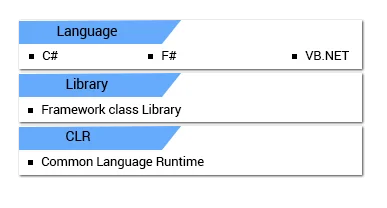
ASP.NET basic architecture is shown below.

Asp.Net Architecture

This .NET framework has the following key components.

  • 1.Language - A .NET Framework is a variety of programming languages including VB.NET and C#.

  • 2.Library - The .NET Framework is a set of a standard class library of reusable classes, interfaces, and value types for ASP .NET development process and system functionality

  • 3.Common Language Runtime(CLR) - The CLR is used to performing code activities. Activities include exception handling and garbage collection mostly.

What Is Asp.net Core:

Asp.net Core is a new version of Asp.net released by Microsoft. It is an open-source used to develop a web framework and can be executed with different browsers like Windows, Mac or Linux. ASP.Net Core is a new version of asp.net. It is a free open source which can run on different OS like Mac, Windows and Linux. It was originally launched as an ASP.NET 5 but later it was renamed to ASP.NET Core and still with the same name.

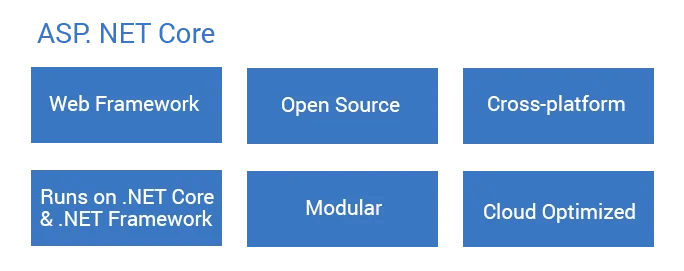
Asp.Net Core Introduction

Asp.Net Core is a cloud-based cross-platform framework to build web apps on Windows, Mac, and Linux including the MVC framework . It is a combination of MVC and WEB API in a single web programming framework.

Major Benefits of ASP.Net Core:

Looking to Hire ASP.Net Web Development Company? - Contact Now

  • 1.Asp.Net core is a much leaner and modular framework because of multiple of architecture

  • 2.Asp.net Core is an open-source framework.

  • 3.Easy to build cross-platform asp.net app on Windows, Mac, and Linux.

  • 4.The configuration is a cloud-ready environment.

  • 5.Ability to host on:
      A) Kestral
      B) IIS
      C) HTTP.sys
      D) Nginx
      E) Apache
      F) Docker

ASP.NET Core Version History:

VersionRelease Date
ASP.NET Core 2.1May 2018
ASP.NET Core 2.0August 2017
ASP.NET Core 1.1November 2016
ASP.NET Core 1.0June 2016

Difference Between Asp.Net VS Asp.Net Core

ASP.NetASP.NET CORE
Asp.Net Build for WindowsAsp.Net Core Build for Windows, Mac and Linux
Asp.Net has a Good PerformanceASP.Net core has higher performances than ASP.Net 4x.
It runs on .Net Framework or commonly called as full .Net FrameworkIt runs on .Net Core and Full .Net Framework.
Asp.Net Supports WebForm, Asp.Net MVC and Asp.Net WebAPI.Asp.Net Core does not support WebForm. It supports MVC, Web API and Asp.Net Web pages originally added in .Net Core 2.0.
Asp.Net used the only IIS with dependant on System.web.dll.Asp.Net Core has not dependant System.web.dll and so the IIS.
Support C#, VB and many other languages and also support WCF, WPF and WFSupport only C#, F# language. VB support to added a short time and no support WCF, WPF and WF but support for WCF client libraries are available.
Asp.Net MVC application added Web.config, Global.asax, Application Start.Core did not support Web.config and Global.asax files. It is supporting appsettings.json.
Container support not more than better as the ASP.Net Core application.Container support best suited for deployments like Docker.
All major versions supportedSupport Core from Visual Studio 2015 update 3 and current version VS 2017.
We Need to re-compile after the code change.Core Browser refresh will compile and executed the code no need for re-compile.

Monday, 2 May 2022

Why NodeJS is Very Popular for Developing Enterprise Level Applications?

Why NodeJS is Very Popular for Developing Enterprise Level Applications?


The digital activity has now made itself present worldwide. The innovations achieved have happened at a fast speed, and now developers are working on smart devices for internet requirements. When it comes to web application development, the Node.js is the most buzzing technology that many businesses decided to embrace in production with the help of eminent
 Node.js web development companies. Node.js framework is the combination of libraries, helpers, and many tools that assist you to create and operate enhanced and best web applications.

No matter how small or big a company or organization is, your application should be spontaneous and customer friendly to win the trust within them. To develop such an application, your business should have the right mindset to choose the technology, environment, and skillful resource team to work over a specific project.

The adoption of Node.js technology is the right choice to develop an application. It is the best technology needed to time to market applications. Node.js is cost-effective and even it has many benefits and fascinating features which lead to more Node.js development. Hence this is the major reason for the growth of Node.js web development company. Time is changing with lightning speed and so are the rules of application development using Node.JS. It has become a popular programming language and it is an easy reach for numerous developers.


Rules of Application Development

The following are the rules of application development which are changing,


Ecosystem

The design Node.JS code is flexible to make the rich ecosystem that can expand on creating applications. It has been crafted by low-level framework software engineers and front-end developers and designers to empower server-side development.

There are several conditions inside the biological system which makes it less demanding to adjust, offer and join.


Modular Design

Java application development structure has worked on several applications. More of the changes came in the picture with the up-gradation of the technology and it has been structured to manage complex programming that resides in complex business conditions. Node.JS uses biological community and tooling.

An internal packages registry in Node.JS can be used to supervise the code and encourages the team to work effectively and with Node.JS developer.


Collaboration

With modular design and accurate ecosystem with Node.JS developer merges together. Java inclined to make a good framework and profound the company with the OOP concept and make the sharing difficult. When the code is shared, it’s in the form of libraries.

It makes the application run easier and faster with lesser, more focused elements that team up worldwide to work together and produce. These element functionalities are easily shared across the teams and applications.

Universal Javascript is known as the practice of sharing Javascript code with Front and Back-end node.js code.


Operational costs

The most important of Node.JS development is that it connects effortlessly to the present-day cloud environment and encourages operation groups to have a connection between computing resources and servers. Java servers are highly examined and have the extra storage capacity to bring high changes of an asset to use.

Key Features that Make Node.js Ideal for Developing Enterprise-level Applications

Every programming language has its advantages for development, but selecting Node.js over other programming languages has some additional advantages. Some globally renowned companies have chosen Node.js for their backend technology for developing applications. Some of those are; Amazon, LinkedIn, NASA, Uber, Netflix, Walmart, etc. Also, PayPal had initially been written in JAVA and was mainly using HTML and JavaScript code for front-end technology. But PayPal decided to migrate PayPal services to a newly introduced technology Node.js because it has permitted for writing the browser and the server applications in the same programming language i.e. JavaScript. As a result, the software team can understand the issues at both ends and react more effectively and quickly to the consumer needs


Node.js is known for offering efficient accessibility and performance

Node.js is based on Google chrome’s V8 runtime that helps to create reliable and fast backend applications. By the assistance of its runtime environment, it can deal with non-blocking I/O operations. This allows it to utilize full-stack JavaScript capabilities, benefiting both the client, as well as server-side applications.


Microservices

Microservices provided by the Node.js framework helps enhance the maintenance of the codes. It also acts to support the serverless approach and display great effectiveness in large and complex projects.

Searching for Reliable NodeJS Developer? Contact Now.


Build real-time apps

Node.js is widely used to build real-time applications that run across distributed devices. Primarily because JavaScript execution occurs speedily due to the single-threaded event loop, and the I/O bound tasks are tackled well by Node.js. In addition to this, Node.js is an event-based server that hinders blocking and can accommodate a huge number of real-time users. The best instances of applications that are build using Node.js are video-conferencing, eCommerce websites, data streaming apps, online gaming apps, messaging apps, etc.


Reusability

The node.js framework minimizes logic replication highly and can be used by multiple applications.


Large Community Support

Node.js has a huge and active community of developers that contribute to its development and efficiency. Since only a few developers are supported by JavaScript programmers, it makes flexible for easy-to-use solutions in GitHub. You have the availability of a Node.js developer who provides you a suitable framework to increase your business at a larger scale.

Rasons why Node.js is promising for 2021

  • It has simplified the application of distinct features and services in both horizontal as well as vertical positions.

  • It is simple to learn and master as well as in high demand due to its abilities and uses.

  • It provides the developer the opportunity to work upon the customers as well as the server applications simultaneously. Hence, it is one of the most advanced full-stack software development frameworks.

  • It is powered by Google Chrome’s V8 engine which adds the fuel to its already high performance.

  • Node.js is supported by a huge community that assists in resolving the problems easily and rapidly.

Conclusion

Node.js is a framework that is an exceptional tool when you need to design enterprise applications in JavaScript. If you are looking for resource-rich frameworks to develop web or mobile application, you can surely go with Nodejs. The benefits of the Node.js framework have been growing constantly with time and environment. The language has been delivering an amazing platform to the customers based on the requirements and desired features.

PowerApps Consulting Services - Driving Innovation in Enterprise Solutions

Driving innovation while keeping costs in check is something that every executive looks for. Microsoft Power Apps is a leading low-code app ...