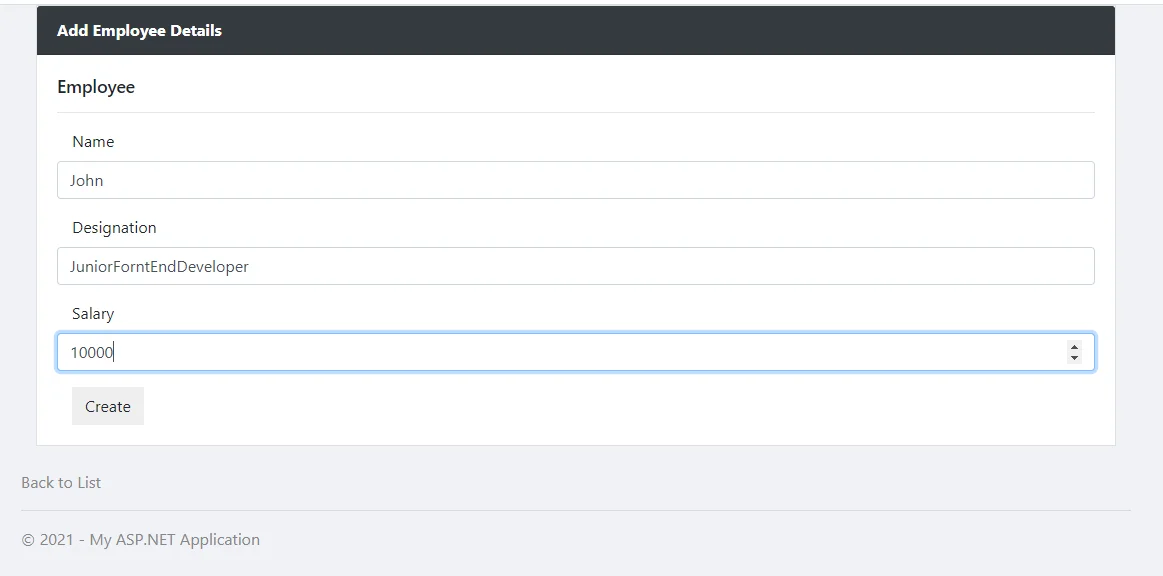
What is ASP.NET?
ASP.NET is a fundamental web development platform used to create websites, applications, and web services. It is the integration of HTML, CSS, and JavaScript. Originally ASP.net was released in 2002. The first version of Asp.Net deployed was 1.0. The Recent Version of Asp.Net is 4.6.
Asp.Net works on HTTP (Hypertext Transfer Protocol) and uses the HTTP commands and policies to set a browser-to-server bilateral communication.
ASP.NET is a part of the Microsoft .NET Framework. The following image shows the component stack.
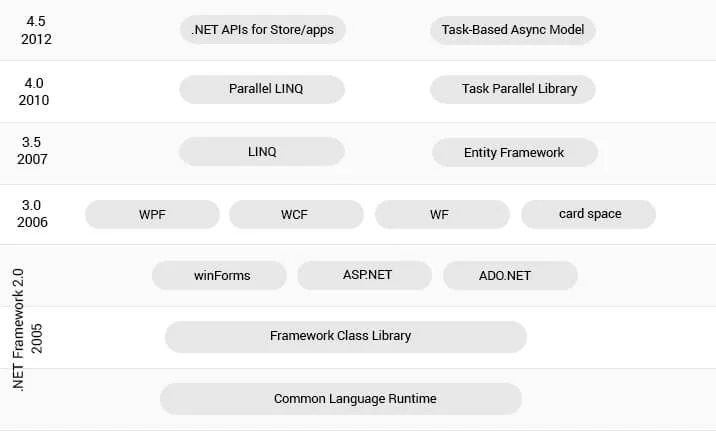
ASP.NET provides three development styles for creating web applications:
- Web Forms
- ASP.NET MVC
- ASP.NET Web Pages
1. Web Forms: ASP.NET web forms extend the event-driven model of interaction to web applications. It is used to develop an application with data access and also provides server-side and event to create an application.
2. Asp.Net MVC: The ASP.NET MVC web development framework employs the MVC design pattern. Unlike ASP.NET, where the view is predetermined, .NET MVC separates app functionality, view data, and model data. It enables you to use critical features like URL authorization, Windows and form authentication, data caching, output management, state management, configuration system, and many more.
3. Asp.Net Web Pages: It is used to create dynamic web pages. It combines server code with HTML in a fast way.
The following table illustrates each development model.
| Model | Skills | Development style | Experience |
|---|---|---|---|
| Web Forms | Win Forms, WPF, .NET | Rapid development using a rich library of controls that encapsulate HTML markup | Mid-Level, Advanced RAD |
| MVC | Ruby on Rails, .NET | Full control over HTML markup, code and markup separated, and easy-to-write tests. The best choice for mobile and single-page applications (SPA). | Mid-Level, Advanced |
| Web Pages | Classic ASP, PHP | HTML markup and your code together in the same file | New, Mid-Level |
The ASP.NET application code can be written in any of the following languages:
- 1. C#
- 2. VB.Net
- 3. J#
Looking to hire .NET developer for your next project?
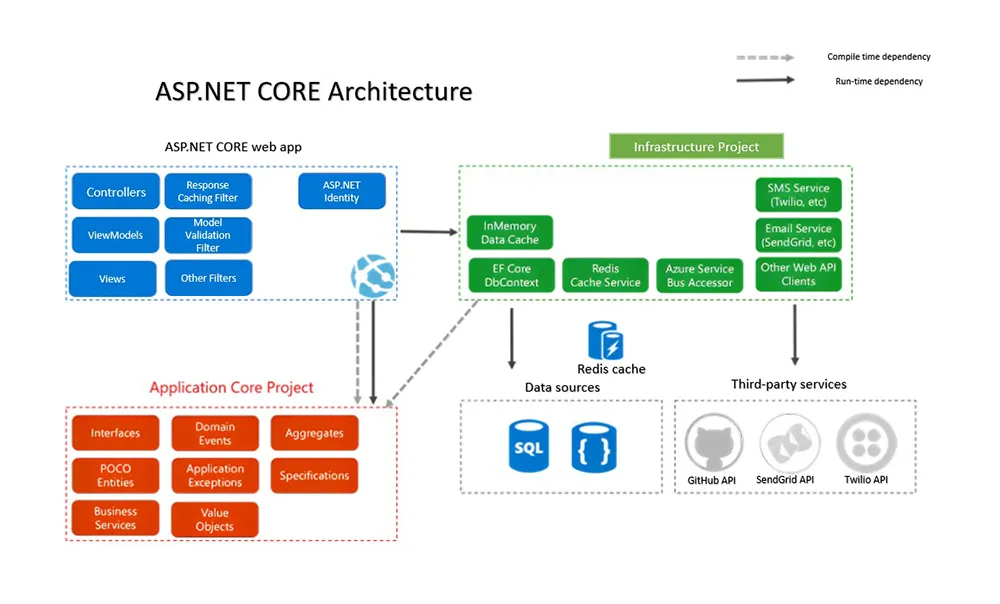
ASP.NET Architecture and its Components
ASP.NET basic architecture is shown below.
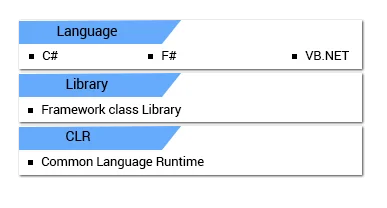
This .NET framework has the following key components.
1. Language - A .NET Framework is a variety of programming languages including VB.NET and C#.
2. Library - The .NET Framework is a set of a standard class library of reusable classes, interfaces, and value types for ASP .NET development process and system functionality
3. Common Language Runtime (CLR) - The CLR is used to perform code activities. Activities include exception handling and garbage collection mostly.
What Is ASP.NET Core?
Asp.net Core is a new version of Asp.net released by Microsoft. It is an open-source platform used to develop a web framework and can be executed with different browsers like Windows, Mac, or Linux. ASP.Net Core is a new version of asp.net. It is a free open source that can run on different OS like Mac, Windows, and Linux. It was originally launched as ASP.NET 5 but later it was renamed to ASP.NET Core and still with the same name.
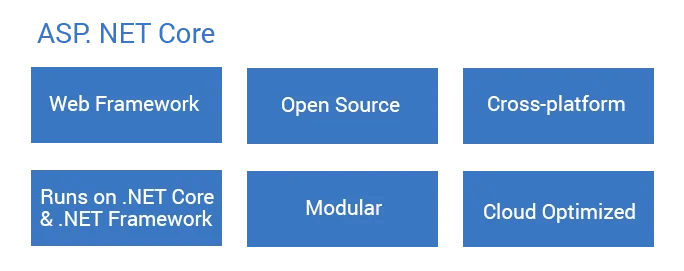
ASP.NET Core is a cloud-based cross-platform framework to build web apps on Windows, Mac, and Linux including the MVC framework. It is a combination of MVC and WEB API in a single web programming framework Core is a cloud-based cross-platform framework to build web apps on Windows, Mac, and Linux including the MVC framework. It is a combination of MVC and WEB API in a single web programming framework.
Turn your vision into reality with the best ASP.NET Web Development Company.
Major Benefits of ASP.NET Core:
1. Asp.Net core is a much leaner and modular framework because of multiple architectures
2. Asp.Net Core is an open-source framework.
3. Easy to build cross-platform Asp.net apps on Windows, Mac, and Linux.
4. The configuration is a cloud-ready environment.
5. Ability to host on:
a) Kestral
b) IIS
c) HTTP.sys
d) Nginx
e) Apache
f) Docker
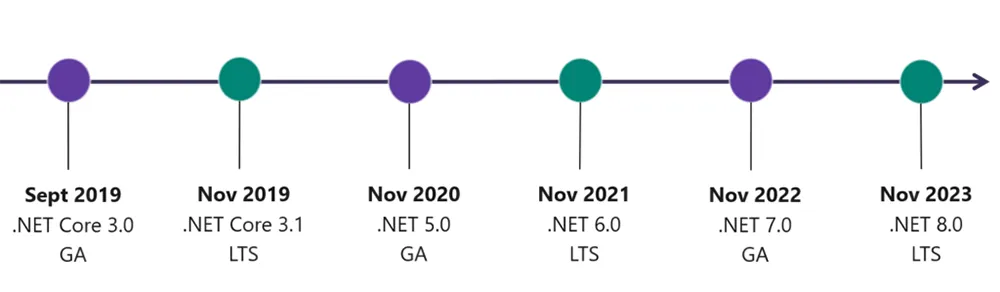
ASP.NET Core Version History:
| Version | Release Date |
|---|---|
| ASP.NET Core 2.1 | May 2018 |
| ASP.NET Core 2.0 | August 2017 |
| ASP.NET Core 1.1 | November 2016 |
| ASP.NET Core 1.0 | June 2016 |
Difference Between Asp.Net VS Asp.Net Core
| ASP.NET | ASP.NET CORE |
|---|---|
| Asp.Net Build for Windows | Asp.Net Core Build for Windows, Mac, and Linux |
| Asp.Net has a Good Performance | ASP.Net core has higher performances than ASP.Net 4x. |
| It runs on .Net Framework or commonly called full .Net Framework | It runs on .Net Core and Full .Net Framework. |
| Asp.Net Supports WebForm, Asp.Net MVC and Asp.Net WebAPI. | Asp.Net Core does not support WebForm. It supports MVC, Web API, and Asp.Net Web pages originally added in .Net Core 2.0. |
| Asp.Net used only IIS with dependent on System.web.dll. | Asp.Net Core has not dependent on System.web.dll and so the IIS. |
| Support C#, VB, and many other languages and also support WCF, WPF, and WF | Support only C#, and F# language. VB support to added for a short time and no support for WCF, WPF, and WF but support for WCF client libraries are available. |
| Asp.Net MVC application added Web. config, Global.asax, Application Start. | Core did not support Web.config and Global.asax files. It is supporting appsettings.json. |
| Container support is not than better the ASP.Net Core application. | Container support is best suited for deployments like Docker. |
| All major versions supported | Support Core from Visual Studio 2015 update 3 and current version VS 2017. |
| We Need to re-compile after the code change. | Core Browser refresh will compile and execute the code with no need for re-compile. |
Now that you are perfectly aware of the key distinctions between ASP.NET Core vs ASP.NET, there are certain questions that many experts still get confused about. Let’s go through them.
Is .NET Core and ASP.NET Core the same?
Many individuals get puzzled when they discover about .Net Core vs Asp.Net Core. Even though they seem similar but there is a small yet critical difference between them.
ASP.NET Core is a web-specific framework used for API and web app development. It is simply implemented on top of .NET CORE.
While .NET Core is a general-purpose programming framework for app development.
Difference between .NET vs .NET Core
Another difference where individuals get confused is .NET vs .NET Core.
.NET framework is an open-source and leading modern web and app development platform with impeccable support for cross-platform compatibility while .NET CORE is an upgraded version of ASP NET framework.
Another difference where individuals get confused is .NET vs .NET Core.
Understanding the differences between ASP.NET vs .NET Core and ASP.NET Core vs .NET Core is essential especially when you try to pick .NET as your career.
ASP.NET development has established itself as a standard in the world of cutting-edge technologies, convincing clients to embrace it for commercial efforts. ASP NET framework has gained new levels of flexibility and increased performance with its newest foundation, .NET Core while remaining a tried-and-true framework and a cornerstone for top-notch web app development.
Let's delve into the key disparities between these two frameworks: .NET vs ASP.NET Core.
Key Features of ASP.NET Framework:
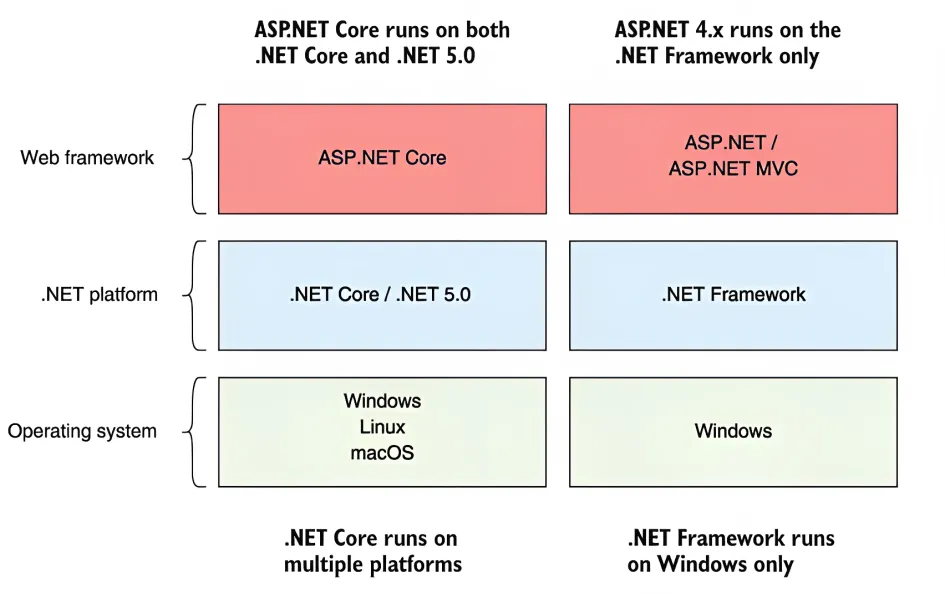
ASP.NET is a rich ecosystem for custom software development offering WebForm features and MVC architecture support. Although this framework provides you with such amazing features, it also has the limitation of being supported by just the Windows platform.
However, the newest version of the ASP.NET framework, .NET Core, has cross-platform compatibility, making .NET even more secure. This is the most important difference between asp.net and asp.net core that everyone should be aware of.
Advantages of ASP.NET Core Over ASP.NET:
Enhanced modularity: ASP.NET Core helps you with enhanced modularity that makes developers easily use the components they require.
Cross-platform support: ASP NET CORE is open-source in nature and offers you amazing features. What makes it even more interesting is its cross-platform compatibility support. This allows developers to build projects of various requirements scenarios.
Lightweight and high performance: The platform is lightweight and known for delivering high performance. This platform helps you with seamless speed and scalability for your business application.
Remarkable security: ASP.NET Core offers both built-in and third-party identity providers to manage authentication. You may enhance project security using CORS management, HTTPS enforcement, app secrets, and so on.
Performance Comparison: ASP.NET Core vs. ASP.NET:
Web applications developed using ASP.NET Core are quicker than those built with Microsoft's ASP.NET framework. This is because the .NET Core platform’s superior execution and usage of the Kestrel web server make it so. Moreover, the excellent support for dependency injection enhances ASP.NET Core with reduced resource overhead and quicker code processes.
Is ASP.NET and ASP.NET MVC the same?
One of the several questions where developers get baffled is MVC vs ASP.NET: Are they the same? These two concepts must be understood clearly before beginning .NET programming.
The ASP.NET framework is completely based on view first architecture, where the view was already decided. While in ASP.NET MVC, the action is executed first, and it can choose any type of View, either from “only View” or “View + data”.
Understanding MVC in ASP.NET and ASP.NET Core:
Both of these frameworks follow the MVC development pattern (Model-View-Controller) for structuring projects and applications. ASP.NET Core, on the other hand, is more versatile and adaptable than the DOT NET framework, which merely follows a convention-based approach. DOT NET developers may use this to modify the architecture of their individual project requirements. .
Dependency Injection in ASP.NET Core and ASP.NET:
The dot net framework apps are cross-platform and easily scalable. Dependency Injection (DI) is one such feature that has been common to both the ASP.NET and .NET Core frameworks. This feature makes bespoke application development more modular with code being maintainable.
ASP.NET Core, however, integrates DI natively into its architecture, making it easier to manage and test dependencies across the application.
Cross-Platform Development with ASP.NET Core:
What makes ASP.NET Core stand out in the crowd is its support for cross-platform compatibility. Because of this, clients tend to hire .NET Core developers to build business apps that run seamlessly on Windows, Linux, and macOS. This flexibility opens new opportunities for reaching a wider audience and reduces deployment constraints.
Deployment and Hosting Differences: ASP.NET vs. ASP.NET Core:
When it comes to net core vs net framework, deployment and hosting options are distinct.
ASP.NET Core provides containerization support using a platform known as Docker. It seamlessly simplifies deployment across different hosting environments.
ASP DOT NET applications, on the other hand, relies completely on Windows server and has limited deployment opportunities.
ASP.NET vs .NET CORE: Choosing the Right Framework
Deciding between ASP.NET Core and ASP.NET platforms for custom .NET software development depends on several factors. This includes meticulous consideration of project requirements, platform inclinations, the level of performance expectations, and many more.
As you navigate this decision-making process, a thorough analysis of your business app demands becomes essential. By delving into the specifics of your business requirements and aligning them with the capabilities and strengths of each platform, you can ensure that your choice is grounded in a well-informed decision. This eventually resonates with the unique goals and characteristics of your project.
ASP.Net vs ASP.NET CORE: Key Points to Consider
ASP.NET, with its established history and wide adoption, remains a reliable choice for legacy applications and projects that require integration with the full .NET Framework.
Organizations that look for stability and Windows compatibility can use this framework. This framework has impressive features, mature tooling, and a rich set of libraries that make custom web development a breeze.
On the other hand, ASP.NET Core emerges as a modern and cross-platform solution that addresses the limitations of its predecessor i.e., ASP.NET.
It blows your mind with impeccable performance, modular architecture, and improved scalability. ASP.NET Core is a great fit for enterprise projects, cloud-based applications, and scenarios where lightweight, high-performance web development is paramount.
Its support for microservices architecture, flexibility, and seamless integration with modern development practices, such as DevOps and containerization, keeps it the preferred choice for many forward-looking developers and organizations.
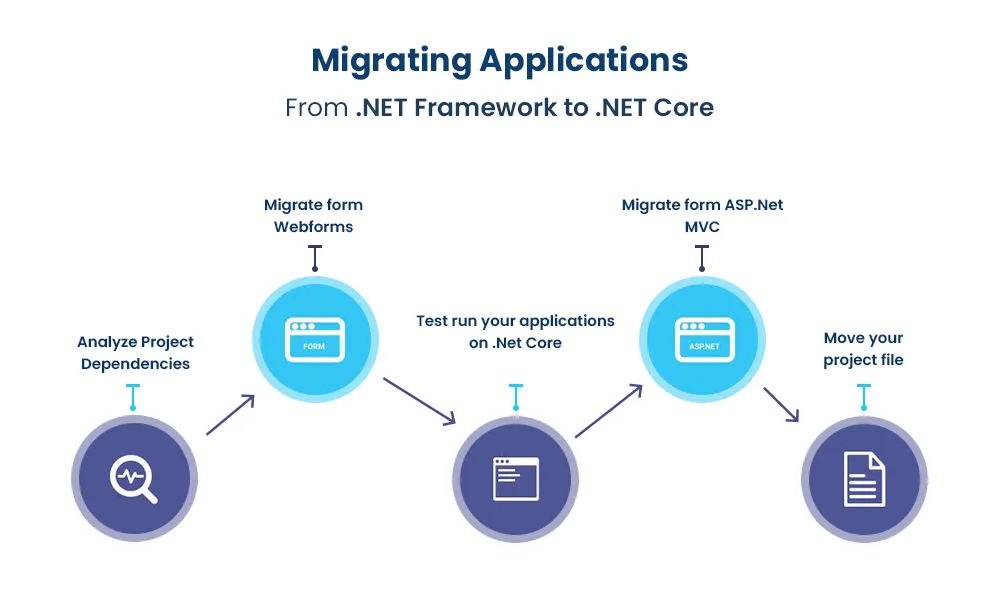
Migration Strategies: Upgrading from ASP.NET to ASP.NET Core:
Migrating from ASP.NET to ASP.NET Core requires careful planning. While the transition can yield benefits in terms of performance and flexibility, it's essential to assess the existing codebase and determine the best approach.
ASP.NET Application use cases.
E-commerce Platforms: ASP.NET is an excellent choice for e-commerce website development entailed with complex features, seamless user experience, and secure payment gateways. Whether it is managing inventory, processing orders, or offering a personalized shopping experience, ASP.NET can effortlessly handle the complexities of online retail.
Enterprise Application Development: Large-scale enterprise applications demand reliability, scalability, and comprehensive security features. ASP.NET is well-suited for crafting intricate internal portals, customer relationship management systems, and data-driven dashboards that facilitate efficient collaboration and decision-making within organizations.
Content Management Systems (CMS): Content-heavy websites and CMSs benefit from ASP.NET's capability to manage and display diverse content types. With features like role-based authentication, user management, and flexible content rendering, ASP.NET empowers businesses to create dynamic and engaging digital experiences.
ASP.NET Core Application use cases.
Cross-Platform Web Applications: ASP.NET Core's cross-platform compatibility is a game-changer for businesses seeking to reach a wider audience. Whether users access your application on Windows, macOS, or Linux, ASP.NET Core ensures a consistent and optimal experience.
Microservices Architecture: In a world of microservices, ASP.NET Core's lightweight and modular nature excels. It's well-suited for building individual microservices that can be easily integrated into a larger system, offering flexibility and scalability as applications evolve.
IoT (Internet of Things) Applications: As the IoT ecosystem expands, ASP.NET Core proves valuable in creating applications that connect and manage devices, sensors, and data streams. Its efficiency in handling real-time data and asynchronous processing makes it an excellent choice for IoT projects.
Outpace your competitors with innovative Angular development services.
Future Trends and Updates: ASP.NET and ASP.NET Core Roadmap
Both frameworks are actively maintained by Microsoft, ensuring continued updates and improvements. ASP.NET Core, with its modular architecture and cross-platform capabilities, is likely to play a pivotal role in the future of web development.
By understanding the nuances of ASP.NET and ASP.NET Core, you can make informed decisions when selecting the right framework for your projects. Whether you prioritize platform independence, performance optimization, or specific development needs, each framework offers unique advantages that cater to different scenarios.
Conclusion
In conclusion, learning the key differences between ASP.NET and ASP.NET Core is essential to make effective decisions during .NET web development. Of course, these two frameworks belong to the so-called ASP.NET ecosystem and have similar goals of creating robust and dynamic web applications, they exhibit distinct features catering to different development scenarios.
Ultimately, the choice between .NET and .NET Core hinges on project requirements, technical constraints, and long-term goals. Evaluating factors such as platform compatibility, performance demands, development team expertise, and deployment environment will guide the decision-making process.
As the technology landscape continues to evolve, both frameworks will play distinct roles, ensuring that developers have the tools they need to build powerful and responsive web applications.
----- Content source: Read here