Friday, 12 January 2024

Why do .NET developers choose Angular over React?


Why do .NET developers choose Angular over React?

Front-end development isn’t easy, it’s freaking hard, which is why many professionals struggle to create needle-moving UIs for their websites and apps. React and Angular are two such platforms that have revolutionized front-end development and have the capability to create visually stunning user interfaces with desired features.

Talking about .NET experts, most of them choose Angular over React because Angular uses the TypeScript language, which is quite comparable to C#, and as a result, they find it easier to work with Angular for UI development. This also helps .NET development companies in upgrading the skills of their current workforce with minimal investment.

In this article, we’ll learn in detail - why .NET developers prefer Angular rather than React.

Angular offers several built-in libraries similar to .NET


“Angular gives the outright feeling of dealing with a framework and offers several built-in libraries similar to .NET. This limits the need to use 3rd party libraries and allows ready-to-work integrations without the fear of incompatibility with the framework. On the other hand, React requires built-on-top libraries such as Gatsby.

When using Angular, a developer has access to HTML files for every component, helping them avoid mixing HTML with JavaScript in a single file. This makes Angular feel more like .NET, thus the preference by .NET developers. In React, however, The template is defined within a JS file, which can confuse .NET developers.”

- Katherine Brown, Founder & Marketing Director at Spyic

“.NET developers prefer Angular over React because of framework feeling. While you start learning Angular’s concepts on its framework, you will be mesmerized to learn this frontend framework. With this, you know that you are dealing with a top-notch framework straight away. Moreover, Angular provides numerous built-in libraries resembling .NET, constraining the usage of 3rd parties and allowing those ready-to-work integrations sans apprehending if or if not it will be compatible with this top-notch framework.”

- Stephen Curry, Business Owner of CocoSign

Angular's syntax is much closer to C#


“Angular's syntax is much closer to C#, a language of preference to most .NET developers.

Angular was created to attract desktop GUI developers to the business, and it appears to be working.

Angular provides most of the features required for modern web front-end development, and it is not needed to go for other frameworks to create front ends with complex levels of complexity.

Angular is similar to the classic object-oriented programming and MVC (model view controller) paradigms. On the other hand, React borrows heavily from FP (functional programming) and expressly frees the developer from the constraints of a rigid model and controller set . It is why experienced programmers still love the somewhat classical approach to program front ends using Angular.

The presence of Web Workers and Server Side Rendering allows web apps to run at maximum speed and efficiency. Scalability is an inbuilt feature of the MVC paradigm, which makes Angular apps inherently scalable. The declarative templates mixed with the developer's components and a vast set of pre-existing parts make new feature building quick and efficient. Unlike React, Angular uses real DOM, which creates faster applications. React uses virtual DOM. Any changes we make need to be reflected in the underlying real DOM, which sometimes makes the update a bit slow.”

- Daniela Sawyer, Founder of FindPeopleFast

“Most C# developers prefer Angular over React because the switch to Angular is straightforward and leans towards the object-oriented nature of JavaScript, unlike React, which focuses more on JavaScript’s functionality nature. Angular is comparatively more in-built functions. It is best useful for .NET developers who want to optimize productivity using already developed software, utilize a large-scale framework with rich features and keep the app’s difficulty level low.

.NET developers also choose to use Angular because it’s designed for the enterprise context and get desktop GUI developers onboard. React is less self-sufficient. However, Angular is full-fledged with the Angular package, and it doesn’t need the inclusion of any library.”

- Harriet Chan, Co-Founder ofCocoFinder

Angular uses TypeScript, a strongly-typed language


“The reason why .NET developers love Angular would be due to the fact that Angular uses TypeScript. So what is special about TypeScript? Let me explain what it means for a programming language to be strongly typed.

A strongly typed language forces a programmer to define the type of variable they are creating in their programs before the variable is used in the program. Programming languages that are not strongly typed allow programmers to simply declare a variable without having to state what type it will be. Rather the type of the variable is determined by the type of the value that is assigned to it when the program is running. Not being strongly typed causes a lot of issues and may trigger numerous errors like when a variable that is assigned a text as its value is suddenly used to perform arithmetic calculations. A strongly-type language will make sure the type of a variable is defined when the variable is declared, and it will only allow values that match that type to be assigned to it.

.NET is a strongly typed programming framework, Angular uses TypeScript (which is strongly typed) while React is generally not. The mind of a .NET developer thinks in a strongly typed manner and when using other languages like Angular they can easily transfer this thinking. With React, it feels like the one is falling down the stairs and the guard rails are breaking at the same time to a .NET developer.”

- BulamaYusuf, Founder & CEO ofIntellectual Apps

“.NET developers prefer using Angular rather than React because typescript (ES6+) is used by Angular (2+) which is significantly closer to C# than JavaScript (ES6+). Take a look at the type and OOP features and syntax. Even the language designer is the same. It's a big package with everything included, so you won't have to learn everything about current web front end development. It resembles the previous OOP (object-oriented programming) and MVC (model view controller) approaches to programming.”

- Marilyn Gaskell, Founder of TruePeopleSearch

.NET ecosystem usually contains all necessary stuff out of the box


“There are a couple of things because it’s happening.

The first one - .NET ecosystem usually contains all necessary stuff out of the box. Whatever you work with ASP .NET, Blazor, or other .NET technology, developers have similar experience from project to project. Every .NET framework contains routing, dependency injection implementation, way to configure a project, defined folder and file structure, etc. The same is for Angular. It’s complete framework which includes everything you need to work on a project. In those conditions developers are able seamlessly switch between different projects and even switch from a .NET backend project to a frontend project written in Angular.

The situation with React is absolutely opposite. React is just a UI library. Everything you need extra must be installed and configured separately. Every task might be solved by a number of similar external packages, every project has their own folder and file structure. That’s why switching between React project might be challenging.

If we join all the above Angular is a great framework for .NET developers to reuse their experience and even enrich it. React experience is not relevant for them.

The second reason - .NET ecosystem uses C# as a programming language. C# is an object-oriented, statically typed language. At the same time Angular written in TypeScript rather than JavaScript. TypeScript is a superset of JavaScript which adds static typing and object-oriented features to it. That does TypeScript more like C# then JavaScript is.

React design and ideology are all about functional programming. Object-oriented programming and functional programming are two different paradigms. React is also written in pure JavaScript rather than TypeScript. Yes, it’s still possible to use React with TypeScript, but it’s not always a case. Other words, Angular ecosystem is understandable and clear environment for .NET developers where they can use well-known objected-oriented practices and design patterns, write code in statically typed language and apply experience they got during whole life.

Buy the way, the author of TypeScript it the same person (Anders Hejlsberg) who created C#. And the main reason he did that is to help C# developers adapt in JavaScript world. And TypeScript is closer to not only C# developers, but any developers who works with typed, object languages like Java.

.NET developers are not usually familiar with functional programming world. They are not able to use their previous experience from C#. React contains not only common functional practices but also have a lot of their own ideas, concepts which you won’t meet in external world, such as React Hooks. That makes experience .NET developers get while working with React not universal and not reusable in other technologies.”

- Ali Ragimov, Senior Frontend Developer atSphere Partners

Angular comes with slick tooling and highly efficient architecture


“The main reason comes down to the fact that Angular comes with slick tooling and highly efficient architecture that allows many large companies to effectively build apps for both their internal processes and external users. Moreover, since it offers a powerful ecosystem with good support from Google, this makes it the most reliable and stable framework with no breaking changes that help to furnish a clean and smooth API, especially in regards to front-end development. After all, enterprises often have huge numbers of users to deal with at a time. As such, this often demands a framework to be self-sufficient in order to fulfill every single need. And, not only does Angular offer the compatibility feature, but it is also an open-source that can effectively boost performance, making it the perfect choice for developing marketplaces and enterprise portals.”

- Eden Cheng, Co-Founder ofPeopleFinderFree

Looking to Hire .NET Developer  for your business ?

Angular is a lot simpler to use, especially when you are not an expert in JavaScript


“.NET developers love Angular rather than React because it is a lot simpler to use, especially when you are not an expert in JavaScript. Angular uses TypeScript which is an extension of the JavaScript language that lets you write code with fewer lines of code and have fewer errors in your application.

Additionally, Angular has more features built-in so there's no need to install various packages. Most of the features include routing, two-way binding, and dependency injection. React, however, is a JavaScript library for building user interfaces. It is very popular but not as popular as Angular.

As a .NET developer, you may need to create your app or extend an existing app by using React. In this case, you need to know how to integrate React with an existing project. It is quite easy to integrate React with Angular since both of them have a similar structure and philosophy.”

- Lynda Fairly, Co-founder ofNumlooker

Conclusion


React and Angular have been the most recommended platforms for frontend development. It enables to create aesthetically appealing user interfaces for websites or apps with required functionalities. In this blog, we learned the reasons why .NET professionals prefer Angular rather than React. To conclude, Angular employs TypeScript language, which is quite similar to C# and takes less effort for .NET professionals to learn.

Source of Content: https://shorturl.at/npzCG


Thursday, 4 January 2024

Empower Your Business: A Deep Dive into PowerApps Development


In the fast-moving business world, staying ahead often means being open to new and creative solutions. One such powerhouse is Microsoft's PowerApps. Today, let's take a journey into the realm of PowerApps development, exploring how it can be a game-changer for your business.

Introduction: Unleashing the Potential of PowerApps

Imagine a world where creating custom business applications doesn't require a coding wizard. That's the promise of PowerApps. In this article, we'll unravel the layers of Power Apps development services, examining its benefits, drawbacks, and the transformative impact it can have on your business.


Table of Contents

| 1.  | Getting Started with PowerApps Development            |

| 2.  | The No-Code/Low-Code Revolution                       |

| 3.  | Integration Magic: Microsoft 365 and Dynamics 365      |

| 4.  | The Need for Speed: Rapid Development and Deployment   |

| 5.  | PowerApps Everywhere: Cross-Platform Compatibility     |

| 6.  | Customization Challenges: Navigating Complexity        |

| 7.  | PowerApps and Your IT Infrastructure: A Symbiotic Bond  |

| 8.  | Cost-Efficiency: Redefining Budgetary Dynamics         |

| 9.  | Empowering End Users: Improved Productivity            |

| 10. | Fort Knox Security: Enhancing Data Security            |

| 11. | User-Centric Insights: Navigating the Human Element    |

| 12. | Conclusion: Harnessing the Power of PowerApps          |


1. Getting Started with PowerApps Development

PowerApps isn't just a tool; it's a gateway to a new era of application development. Even if you've never written a line of code, PowerApps empowers you to craft applications that suit your business needs.

2. The No-Code/Low-Code Revolution

Say goodbye to the days where only coders could shape digital solutions. PowerApps introduces a no-code/low-code environment, putting the ability to innovate directly into the hands of non-developers.

3. Integration Magic: Microsoft 365 and Dynamics 365

Imagine your business tools working in perfect harmony. With PowerApps, integration with Microsoft 365 and Dynamics 365 is seamless, creating a unified ecosystem for data management.

4. The Need for Speed: Rapid Development and Deployment

In business, speed matters. PowerApps enables rapid prototyping, development, and deployment, ensuring your solutions are ready to meet the ever-changing demands of the market.

5. PowerApps Everywhere: Cross-Platform Compatibility

Whether you're on a desktop, tablet, or smartphone, PowerApps ensures your applications run smoothly across all platforms. Flexibility at its finest.

6. Customization Challenges: Navigating Complexity

While PowerApps is a versatile tool, highly intricate business processes might pose challenges. We explore the balance between customization and complexity.

7. PowerApps and Your IT Infrastructure: A Symbiotic Bond

For businesses deeply invested in alternative platforms, integrating PowerApps may require careful consideration. How does it fit into your existing IT infrastructure?

8. Cost-Efficiency: Redefining Budgetary Dynamics

No need for a massive development team. PowerApps reduces costs, making custom application development accessible even for businesses with tight budgets.

9. Empowering End Users: Improved Productivity

Break free from IT dependencies. PowerApps empowers end-users to create applications tailored to their specific needs, boosting overall productivity.

10. Fort Knox Security: Enhancing Data Security

Your data is crucial. PowerApps ensures secure storage in Microsoft's cloud environment, offering robust security measures for sensitive information.

11. User-Centric Insights: Navigating the Human Element

In the world of PowerApps, user experience is paramount. We delve into the importance of user training and support for maximizing the benefits of PowerApps.

12. Conclusion: Harnessing the Power of PowerApps

As we conclude this deep dive, remember that PowerApps isn't just about creating applications; it's about transforming the way you do business. Embrace the power it offers and propel your business into a new era of innovation.

FAQs: Answers to Your Burning Questions

Q1: Is PowerApps development only for experienced coders?

A1: Not at all! PowerApps is designed for both seasoned developers and those with no coding experience. Its no-code/low-code environment opens the door for everyone to contribute to app development.

Q2: Can PowerApps integrate with non-Microsoft platforms?

A2: While PowerApps seamlessly integrates with Microsoft 365 and Dynamics 365, it also offers connectors for various non-Microsoft platforms, ensuring compatibility with a wide range of systems.

Q3: What are the potential drawbacks of heavy customization in PowerApps?

A3: While PowerApps allows extensive customization, intricate processes may pose challenges. Striking the right balance between customization and complexity is crucial.

Q4: How secure is data stored in PowerApps?

A4: PowerApps stores data securely in Microsoft's cloud environment, implementing robust security measures. It's a reliable solution for businesses dealing with sensitive information.

Q5: Can end-users really create applications without IT support?

A5: Absolutely! PowerApps' no-code/low-code environment empowers end-users to create applications tailored to their needs, reducing dependency on IT departments.

In conclusion, the journey into PowerApps development unveils a world of possibilities. Whether you're a coding maestro or a tech novice, the power to transform your business is now within reach. Harness the potential, embrace the change, and let PowerApps elevate your business operations to new heights.

Tuesday, 2 January 2024

PowerApps Development: Best Practices and Essential Tips for Success


Power Apps Development: Best Practices and Essential Tips for Success


Introduction:

Power Apps, a part of the Microsoft Power Platform, empowers users to create custom business applications without the need for extensive coding knowledge. However, to ensure the success of your PowerApps development projects, it's crucial to follow best practices and leverage essential tips. In this blog post, we'll explore key strategies to enhance your Power Apps development experience.

1. Understand Your Business Requirements:

Before diving into Power Apps development, thoroughly understand your business requirements. Identify the specific needs, workflows, and functionalities your application must fulfill. A clear understanding of the objectives will guide you throughout the development process.

2. Leverage Power Platform Governance

Implement robust governance practices to maintain control over your Power Apps environment. Utilize the Power Platform Admin Center to manage permissions, data policies, and application lifecycles. This ensures a secure and well-managed development environment.

3. Design User-Friendly Interfaces:

User experience is paramount. Create intuitive and user-friendly interfaces to enhance the overall usability of your Power Apps. Leverage consistent design principles, use clear navigation, and optimize layouts for various devices to ensure a seamless user experience.

4. Optimize Data Sources:

Efficiently manage and optimize your data sources. Leverage the Common Data Service (CDS) for a unified and scalable data platform. Properly structure your data, validate inputs, and use delegable queries to enhance performance, especially when dealing with large datasets.

5. Version Control and Documentation:

Implement version control and maintain detailed documentation throughout the development process. Power Apps allows you to create different versions of your application, ensuring you can roll back changes if needed. Documenting your app's logic, data structures, and dependencies is crucial for future maintenance and collaboration.

6. Test Rigorously:

Thorough testing is essential for the success of any application. Test your Power Apps across various scenarios, devices, and user roles to identify and address potential issues. Incorporate user feedback to refine and improve your application continuously.

7. Leverage Power Automate Integration:

Integrate PowerApps with Power Automate (formerly Flow) to automate business processes seamlessly. This integration enhances the efficiency of your applications and allows for automated workflows, notifications, and data updates.

8. Monitor Performance and Analytics

Regularly monitor the performance of your Power Apps using analytics and telemetry data. Identify bottlenecks, track user engagement, and use insights to make informed decisions for optimizing the application's performance over time.

Conclusion:

Incorporating these best practices and essential tips into your PowerApps development process will contribute to the success and effectiveness of your custom business applications.

Thursday, 28 December 2023

How to Ace Your Software Development Using C# and React.js


In the dynamic world of software development, the fusion of C# and React.js technologies became the hallmark of innovation. C# and React.js, a formidable duo, help businesses break their conventional boundaries and transform their digital processes with matchless versatility and efficiency.

According to a survey done across several sectors, 70% of prominent organizations have used C# and React.js as their core technology for developing cutting-edge software solutions. This number demonstrates not just the broad use of new technologies, but also their revolutionary influence on enterprises.

- C# stands as the backbone, that helps you architect scalable and secure backend systems.

- While React.js assists you in delivering captivating user interfaces to redefine the user experience.

In this blog, we will unveil the significance of C# and React.js, and their potential to take your custom software development initiatives to new heights.

C# in Modern Software Development: Key takeaways

- Versatile backend language

- Object-oriented approach

- Rich standard library

- Secure and scalable

- Known for its strong type-checking.

- Enhanced code reliability.

Embrace innovation and agility with a leading desktop application development company.

React.js in Modern Software Development: Key takeaways

- Dynamic frontend development

- Component-based architecture

- Facilitates code reusability.

- Virtual DOM for performance

- Faster and smoother user interactions.

- Community support and resources

- Cross-platform compatibility

- Appealing UI with enhanced user experience

Why choose C# and React.js for custom software development?

The tandem of C# and React.js brings a harmonious balance to modern software development, effectively managing both client-side dynamism and server-side resilience.

Take a look at the following picture illustrating why C# andReact.js are the ideal combinations for DOT NET software development.

why-use-react.js+csharp

Building Responsive User Interfaces with React.js

In the current realm of .NET CORE software development, creating UIs that captivate users is paramount. Adopt React.js, a JavaScript library that shines in the field of dynamic and responsive user interfaces, revamping the way developers approach front-end development.

1. Component-Based Architecture:


• React.js's component-based architecture promotes a modular strategy. Similar to building blocks, components contain certain UI features and capabilities.

• Because of its modularity, the application can be developed more easily and its components can be seamlessly reused in other portions of the program.

2. Virtual DOM for Efficient Rendering:

• One of React.js's key strengths lies in its use of a Virtual DOM (Document Object Model). Instead of updating the entire DOM when changes occur, React.js smartly updates only the parts that need it.

• Thus, rendering becomes quicker, and the user experience is more seamless, which is especially important for apps that have dynamic content and frequent changes.

Read More: Is C# the right choice for Legal business software development?

3. Declarative Syntax for Clear Code:

• Because React.js encourages a declarative syntax, developers may specify how they want the user interface to appear and React will update the DOM appropriately.

• This clear and concise syntax enhances code readability, making it easier for developers to understand and maintain their codebase.

4. Efficient State Management:

• React.js introduces a straightforward way to manage the state of an application. By maintaining a single source of truth, developers can easily track changes and update the UI accordingly.

• Efficient state management is vital for creating responsive interfaces that adapt to user interactions seamlessly.

5. Real-Time Updates with React.js:

• React.js excels in real-time applications where data changes frequently. Its ability to efficiently update the UI in response to dynamic data ensures users experience up-to-the-moment information without the need for manual refreshes.

6. Thriving Open-Source Community:

• With a vibrant and active open-source community, React.js benefits from constant enhancements, bug fixes, and the introduction of new features.

• Developers can tap into a wealth of resources, libraries, and tools, ensuring they stay on the cutting edge of UI development.

This is how React.js remains the preferred choice with C# in many C# development companies. This technology empowers developers to go beyond static web pages, offering a framework that brings applications to life with interactive and visually appealing user interfaces. Its emphasis on simplicity, efficiency, and a component-based approach makes React.js a go-to choice for those aiming to create engaging user experiences that resonate with modern audiences.

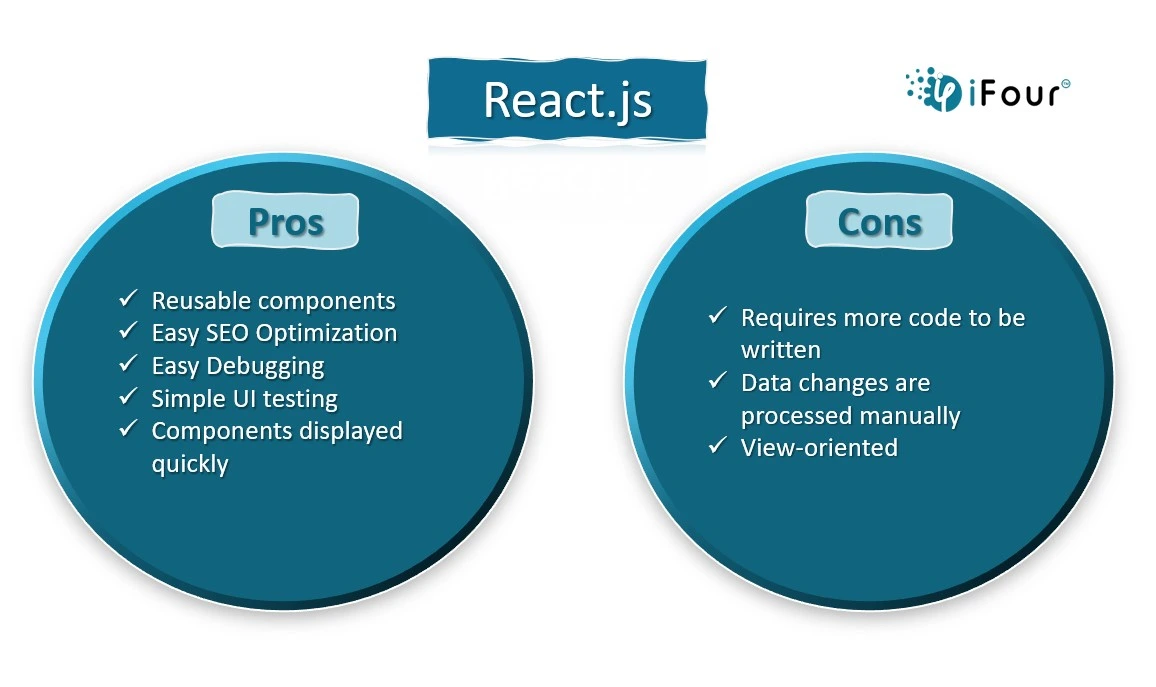
React.js-pros-cons

Leveraging C# for Backend Excellence

C# has caught huge traction in the world of .NET software development as it powers up applications with seamless functions and features. C#, a versatile and powerful programming language, stands out for its robust backend capabilities. Given below are the key features that make C# a stalwart choice for crafting robust server-side applications.

1. Strong Typing and Safety:

Because of its robust typing system, variables in C# are guaranteed to be declared together with their data types. This lowers the possibility of runtime problems by creating a more reliable and safer codebase.

2. Object-Oriented Paradigm:

C# encourages the usage of classes and objects by the object-oriented programming (OOP) paradigm. This approach facilitates reusability, improves code structure, and makes complicated backend system maintenance easier.

3. Asynchronous Programming:

One of C#'s best features is asynchronous programming. The ability to design bespoke applications that can handle several activities at once, improving performance and responsiveness in situations like managing multiple requests or I/O operations, is what makes this so intriguing.

Turn your vision into reality with an esteemed Mobile app development company.

4. Exception Handling:

Exception handling in C# is robust and structured. Developers can efficiently manage and control exceptions, ensuring that applications gracefully handle unforeseen errors without compromising overall stability.

5. LINQ (Language Integrated Query):

LINQ is a powerful feature that integrates querying directly into the C# language. It simplifies data manipulation and retrieval from various sources, such as databases, collections, and XML, streamlining backend data processing.

6. Scalability:

C# is well-suited for building scalable applications. Its architecture allows developers to design systems that can handle increased workloads smoothly, making it an ideal choice for both small-scale projects and enterprise-level applications.

7. Integration with .NET Framework and .NET CORE:

C# seamlessly integrates with the .NET ecosystem, including the .NET Framework and .NET CORE. This integration provides a rich set of libraries and frameworks, empowering developers with tools for building diverse and feature-rich backend functionalities.

8. Cross-Platform Compatibility:

With the advent of .NET Core, C# has extended its reach beyond the Windows ecosystem. Developers can leverage C# to build cross-platform applications, reaching a broader audience and ensuring flexibility in deployment.

Read More: Software technology trends that impact the Environment industry

9. Security Features:

C# incorporates security features such as Code Access Security (CAS) and robust encryption libraries, fortifying applications against common security threats.

10. Community Support and Documentation:

The C# community is vibrant and supportive. Ample documentation and community-driven resources make it easier for developers to troubleshoot issues, learn new concepts, and stay updated on best practices.

With these powerful C# features, .NET developers may create backend systems that are not just functional but also scalable, maintainable, and secure.

Tips and best practices for integrating C# and React.js

The integration of backend (C#) and frontend (React.js) technologies resembles the artful coordination of symphony. To create a harmonious and efficient development environment, developers must adhere to best practices that ensure seamless collaboration between these two powerful technologies. Let's delve into the guidelines that foster a cohesive union of C# and React.js.

1. Embrace a Component-Based Approach:

Leverage React.js's component-based architecture to break down the frontend into modular components. Align these components with corresponding backend functionalities in C#. This modular approach streamlines software development, enhances code reuse, and simplifies the maintenance of the entire application.

2. Establish Clear Communication Channels:

Ensure effective communication between the C# backend and React.js frontend. Define clear APIs (Application Programming Interfaces) that facilitate data exchange. RESTful APIs or GraphQL can be employed to establish a standardized communication protocol, fostering a smooth and predictable interaction.

3. Leverage State Management Wisely:

Thoughtfully manage the state of the application. While React.js excels in frontend state management, ensure that critical state information is appropriately handled on the backend, especially for tasks like user authentication, authorization, and managing global application state.

Increase your business efficiency with a leading WPF development company.

4. Implement Asynchronous Operations:

Harness C#'s asynchronous capabilities to optimize data fetching and processing. When React.js components require data from the backend, asynchronous operations ensure responsiveness without blocking the user interface. Employ async/await patterns judiciously to handle asynchronous calls efficiently.

5. Secure Your Application:

Prioritize security throughout the integration. Implement secure authentication mechanisms to protect sensitive data during communication. Employ HTTPS for secure data transmission and validate user inputs on both frontend and backend to guard against common security vulnerabilities.

6. Cross-Origin Resource Sharing (CORS):

Handle CORS configurations diligently. Cross-Origin Resource Sharing can pose challenges when integrating frontend and backend hosted on different domains. Set up CORS policies on the backend to explicitly define which domains are allowed to access resources, ensuring a secure and controlled environment.

7. Version Control and Continuous Integration:

Implement version control systems (e.g., Git) for both backend and frontend codebases. Set up continuous integration pipelines to automate the testing and deployment processes. This ensures that changes are systematically validated and deployed, reducing integration hiccups.

Read More: What’s the Future of WPF in 2024

8. Establish Development Environments:

Create consistent development environments for both C# and React.js. Utilize tools like Docker to containerize applications, ensuring that they run consistently across various development machines. This minimizes the "it works on my machine" issue, promoting a seamless development experience.

9. Prioritize Error Handling and Logging:

Implement robust error-handling mechanisms on both the backend and frontend. Ensure that error messages are informative yet secure, revealing minimal sensitive information. Implement comprehensive logging to facilitate debugging and issue resolution.

10. Foster Collaboration and Documentation

Cultivate collaboration between backend and frontend developers. Maintain thorough documentation for APIs, data structures, and coding conventions. This ensures that team members can easily understand and contribute to both ends of the application.

By adhering to these best practices, developers can seamlessly integrate C# and React.js, transforming the development process into a symphony of efficiency and collaboration. The result is an application that not only functions seamlessly but also evolves gracefully over time.

Conclusion: React.js and C# for custom software development

In this blog of bespoke software development with C# and React.js, we've discovered a powerful combination for creating not just functional but engaging applications. React.js as the creative painter of the frontend and C# as the expert sculptor of the backend, work together perfectly to craft dynamic digital experiences.

We've learned the features of React.js and C# and explored the key principles like building modularly, effective communication, and smart data management. These are the key ingredients for creating responsive, scalable, and easily maintainable software. By incorporating security measures and collaborative practices, developers enhance their skills, producing standout digital experiences.

The source of content is here: https://www.ifourtechnolab.com.au/blog/how-to-ace-your-software-development-using-c-and-react-js


Wednesday, 27 December 2023

Streamline Your Outlook Add-ins Development with React.js: Best Practices and Tips


JavaScript has become a critical part of our daily lives. To understand its impact, just disable JavaScript in all of your browsers for two or three days and observe. There will be no pop-ups or advertisements on your screen, and the page will load quickly with boring typical elements. Even your favorite applications, like Facebook, Instagram, Netflix, and others, will stop working. This is how JavaScript's interactive features affect our lives.

JavaScript has evolved rapidly throughout the years, with fascinating and amazing upgrades. React.js is one of the versions that had a considerable influence on the software field impelling companies to hire React.js developers for all their front-end development needs.

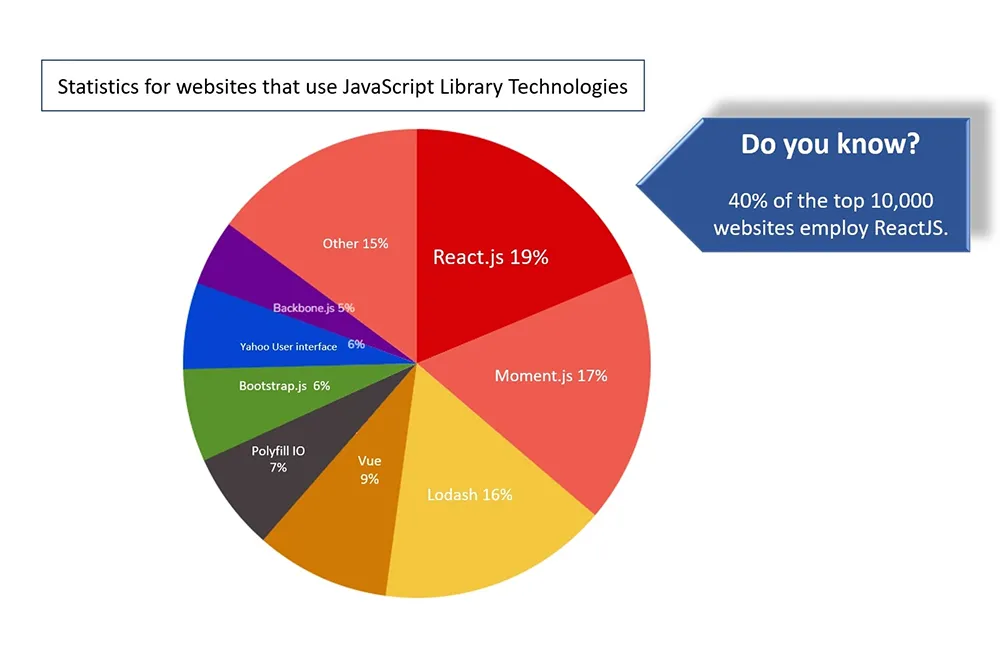
You may wonder to learn that React is not only the most popular choice of Indian developers but also a top-ranked JavaScript library applied in 40% of the top 10,000 websites worldwide.

Critical factors for ecommerce

React.js library is also the best choice for Office Addins development and if you’re looking to streamline Outlook Add-in development, you’ve come to the right spot. With React.js, you can create better and more effective plug-ins optimized for desktop and mobile devices.

However, unless you follow the right tips and practices, you may encounter challenges. That's why we've put together this tutorial to assist you traverse the world of Outlook plug-in development using React.js.

However, unless you follow the right tips and practices, you may encounter challenges. That's why we've put together this tutorial to assist you traverse the world of Outlook plug-in development using React.js. with React.js together!

What is React.js and why use it for Outlook Plug-ins?


React.js is a popular JavaScript library used to build interactive user interfaces. It is fast, flexible, easy to use, and more importantly, an ideal choice for Outlook extensions development.

Here are the reasons to use React.js for Outlook Add-ins development:

  • It helps you with code reusability and makes it easier to maintain and update your add-ins.
  • Offers component-based architecture to break down your add-in into smaller and reusable components.
  • Offers component-based architecture to break down your add-in into smaller and reusable components.
  • Provides Virtual DOM to update plug-ins quickly and efficiently.
  • Results in better performance and user experience.

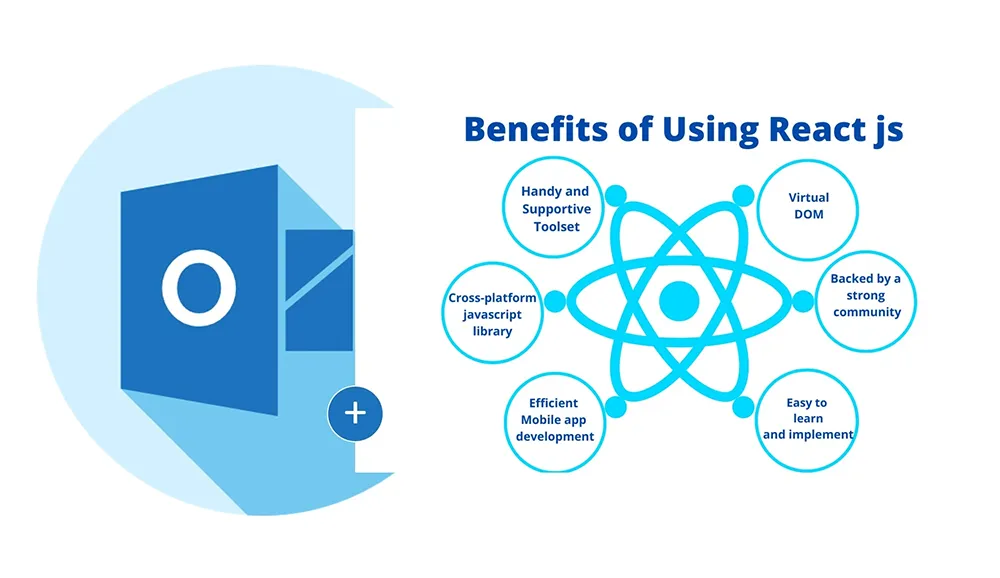
The following figure depicts the core benefits of using React.js.

Critical factors for ecommerce

Best practices for developing React.js-based Outlook Plug-ins


People favour Office 365 solutions because of their flexibility and centralized access to Microsoft tools. Because Outlook is one of them, it's critical to design Outlook Plug-ins using React-best practices to ensure they're effective and user-friendly.

Here are some best practices to keep in mind:

Make use of a modular approach while Add-ins development:

Break your code into smaller, and reusable components. It will help you manage and update your plug-ins over time.

Optimize performance using recommended techniques:

Use techniques such as lazy loading, code splitting, and others to ensure that your plug-in loads quickly and efficiently.

Make sure you build a responsive design:

Ensure that your plug-in is optimized for different devices and platforms, including desktops, smartphones, and tablets.

Make sure you build a responsive design:

Use automated testing tools to ensure that your plug-in is working correctly and efficiently.

Follow security best practices:

Use automated testing tools to ensure that your plug-in is working correctly and efficiently.

Tips for optimizing the performance of your React.js-based Outlook Plug-ins


You are now well-aware of using React.js and how it delivers speed and user experience for your application. It is critical to review the greatest performance suggestions for these Add-ins. However, to optimize your plug-in's performance, you need to follow some tips and techniques.

You are now well-aware of using React.js and how it delivers speed and user experience for your application. It is critical to review the greatest performance suggestions for these Add-ins. However, to optimize your plug-in's performance, you need to follow some tips and techniques.

Code-splitting and Lazy loading

Divide your code into smaller bits and only load the code that is required. Asynchronously load your plug-in's components to boost performance and minimize page load times.

Use caching and minimize HTTP requests

To enhance speed, reduce the amount of HTTP queries made by your plug-in. Cache the data and resources of your plug-in to decrease server queries and enhance performance.

Optimize media resources

Use optimized images and media files (if any) to reduce file size and improve performance.

How to leverage the Outlook Add-in API with React.js?


One of the challenging things you may face as a developer is creating user-friendly Add-ons for MS Office platforms. To do so, you can make the most out of something known as the Outlook Add-in API.

The Outlook Add-in API provides a collection of JavaScript objects and methods for interacting with the Outlook client and creating sophisticated plug-ins.

  1. Use the Office.js library: The Office.js library provides a set of JavaScript objects and methods that allow you to interact with the Outlook client.
  2. Use the Outlook Add-in API objects: The Outlook Add-in API objects provide access to different parts of the Outlook client, including the user's mailbox, calendar, and contacts.
  3. Use the Office UI Fabric: The Office UI Fabric provides a set of React.js components that allow you to create a consistent and user-friendly user interface.

Testing and Debugging your React.js-based Outlook Plug-ins


Apart from requirements gathering and developing, the next most important factors

developing Testing and debugging are crucial for any software or application to ensure that they work correctly and efficiently.

  1. Use automated testing tools: Use automated testing tools to ensure that your plug-in is working correctly and efficiently.
  2. Use the browser's developer tools: Use the browser's developer tools to debug your plug-in's JavaScript code.
  3. Use the Office Add-in Debugger: Use the Office Add-in Debugger to debug your plug-in's JavaScript code and HTML markup.
  4. Use a network analyzer: Use a network analyzer to monitor your plug-in's network traffic and identify any performance issues.

Common challenges and their solutions


Developing Outlook Plug-ins with React.js can be challenging, especially if you're new to the technology. Here are some common challenges you may face and how to overcome them:

  1. Performance issues: If your plug-in is slow or unresponsive, use the performance optimization tips we've discussed to improve its performance
  2. Cross-browser compatibility issues: Test your plug-in on multiple browsers and devices to ensure that it works correctly and efficiently.
  3. API compatibility issues: Ensure that your plug-in is compatible with the latest version of the Outlook Add-in API.
  4. Security issues: Follow security best practices to protect your plug-in and your users' data.

Embrace innovation and agility with our DOT NET development services

Tools and resources for developing React.js-based Outlook Plug-ins


To streamline your Outlook Plug-in development with React.js, you can use a variety of tools and resources. Here are some tools and resources you may find useful:

developing Testing and debugging are crucial for any software or application to ensure that they work correctly and efficiently.

  1. Visual Studio Code: Visual Studio Code is a lightweight and powerful code editor that offers outstanding React.js development support.
  2. React Developer Tools: React Developer Tools is a browser plugin that offers React.js developers with debugging and profiling tools.
  3. Office Add-in Designer: The Office Add-in Designer is a web-based tool for creating and customizing Outlook Plug-ins with React.js.
  4. Microsoft Graph API: The Microsoft Graph API provides a set of REST APIs that allow you to integrate your plug-in with other Microsoft services, including SharePoint, Microsoft Teams, and OneDrive.

Examples of successful React.js-based Outlook Plug-ins


To inspire you and give ideas for your own plug-ins, here are some examples of successful React.js-based Outlook Plug-ins:

developing Testing and debugging are crucial for any software or application to ensure that they work correctly and efficiently.

  1. Boomerang: Boomerang is a well-known email productivity application that lets you schedule emails, make reminders, and snooze emails. Boomerang's user-friendly UI and strong capabilities have assisted numerous users in increasing their productivity and staying on top of their email game.
  2. ClearContext: ClearContext is a robust email management application that lets you organize your inbox, prioritize emails, and automate activities. ClearContext also provides metrics on email consumption, allowing users to pinpoint areas where they may increase their productivity. With its simple UI and time-saving features.
  3. Salesforce Inbox: Salesforce Inbox is a CRM (customer relationship management) tool that allows you to manage your marketing and sales activities right from your inbox.
  4. Trello: Trello is a project management tool that has also been built with React.js and integrated into Outlook. This integration allows for seamless collaboration and organization within teams, making it a popular choice for businesses of all sizes.
  5. Yesware: Yesware is another Outlook plug-in that has leveraged the power of React.js to become a success. This plug-in helps sales teams track and manage their email communication with prospects and customers.
  6. HubSpot Sales: HubSpot Sales is another Outlook plug-in that has been built with React.js and has become a huge success. This plug-in allows users to manage their sales pipeline directly from their inbox, with features like email tracking, meeting scheduling, and contact management.

Conclusion


Developing Outlook Plug-ins with React.js can be a challenging task, but by adhering to practices and employing the right web development resources you can streamline your Addins development process. Remember to optimize your Add-ins for performance, make use of the Outlook Add-in API, and thoroughly test them. In this blog, we learned the importance of React.js, the best strategies for Outlook add-in development, their common challenges, and the kind of solutions. With these tips and techniques, you can create successful and innovative plug-ins that will help you stand out from the competition.

Content Source: https://www.ifourtechnolab.com/blog/streamline-your-outlook-add-ins-development-with-react-js-best-practices-and-tips


PowerApps Consulting Services - Driving Innovation in Enterprise Solutions

Driving innovation while keeping costs in check is something that every executive looks for. Microsoft Power Apps is a leading low-code app ...